Post Outline
- Chapter Goals and Outline
- Links
- Introduction
- Mixture Model Trading Algorithm Outline
- GMM Algorithm Implementation
- Next Steps
Chapter Goals and Outline
- Use Part 3 - strategy research as a basis for algorithmic trading strategy.
- Implement strategy using the Quantconnect platform.
Links
Introduction
This notebook will walkthrough the algorithm implementation process on the quantconnect platform. Please be advised that this notebook will not actually run the algorithm as I have not installed the quantconnect backtesting engine locally. This is a demonstration of the process. The script is available to copy and paste into the quantconnect environment within the ./scripts/ directory of the github repo.
Key Notes About The Quantconnect Platform
- They use Python 2.7 and I do not know when/if Python 3 will be supported.
- There is no interactive debugger at this time. Troubleshooting can be difficult if your algorithm is not logically structured for modularity.
- There are some minor data issues that their team is hard at work correcting. At times there are trades that get filled that are in error so investigating the trade level data is important and fortunately straightforward to do.
- Calls to the History() function create major RAM/time penalties so it is important to code your algorithm to be efficient with its data requests.
Mixture Model Trading Algorithm Outline
The algorithm will use Gaussian Mixture Models (GMM) to determine return outliers. Based on outlier direction the algorithm will go long (or short) the ETF. Based on the research conducted in chapter 3 I determined one tradeable pattern to be a long-only strategy with a 63 day holding period, post outlier event. The basic structure of the algorithm is:
Check open orders:
- confirm all orders are filled
- track fill dates
Check if any current holdings meet liquidation criteria. In this implementation the only liquidation criteria is whether we have held the security for the 63 day period.
- check if today's date is greater than or equal to liquidation date.
- if so liquidate the position.
Run the main algorithm computation. In this implementation we use a lookback of 252 days or approximately 1 trading year.
- fit the GMM using N components.
- extract hidden states and their parameters
- sample from the chosen distribution using those parameters
- compute confidence intervals
- compare intervals with current return to identify outliers
- assess direction of outliers e.g. too_low or too_high
- assign securities to long (or short) based on direction of outliers
Use computed results to send orders.
- this implementation uses MarketOnOpenOrders. This means that market orders are sent for the next day's open after an outlier event is triggered.
GMM Algorithm Implementation
First the Quantconnect algorithm imports
Next we setup a PARAMETER_REGISTRY. This helps associate the chosen set of parameters with each backtest. Without it there is no way to know what parameters were used with which backtest when you go to compare results at a later date. However by registering the parameters we can log them. These backtest logs are always available for download when you load the results of your backtest.
Next up we define and register the global parameters that the algorithm class will use. These parameters contain a flag which logs whether the strategy was implemented as long-only, the number of samples for our confidence interval sampling, the chosen distribution we are using, and the parameters for the sklearn GMM we will implement.
Next we define a couple of global functions to make the algorithm computation a little simpler.
Now we define the algorithm class which will implement the strategy. In quantconnect all algorithms are a class with at least 2 functions defined: Initialize() and OnData().
Initialize contains the algorithm setup including universes, class level objects, brokerage models, and scheduled functions.
OnData is the event handler that is called at the resolution we choose e.g. minute, hour, daily. However because this algorithm uses scheduled functions this function is not needed and is simply pass(ed).
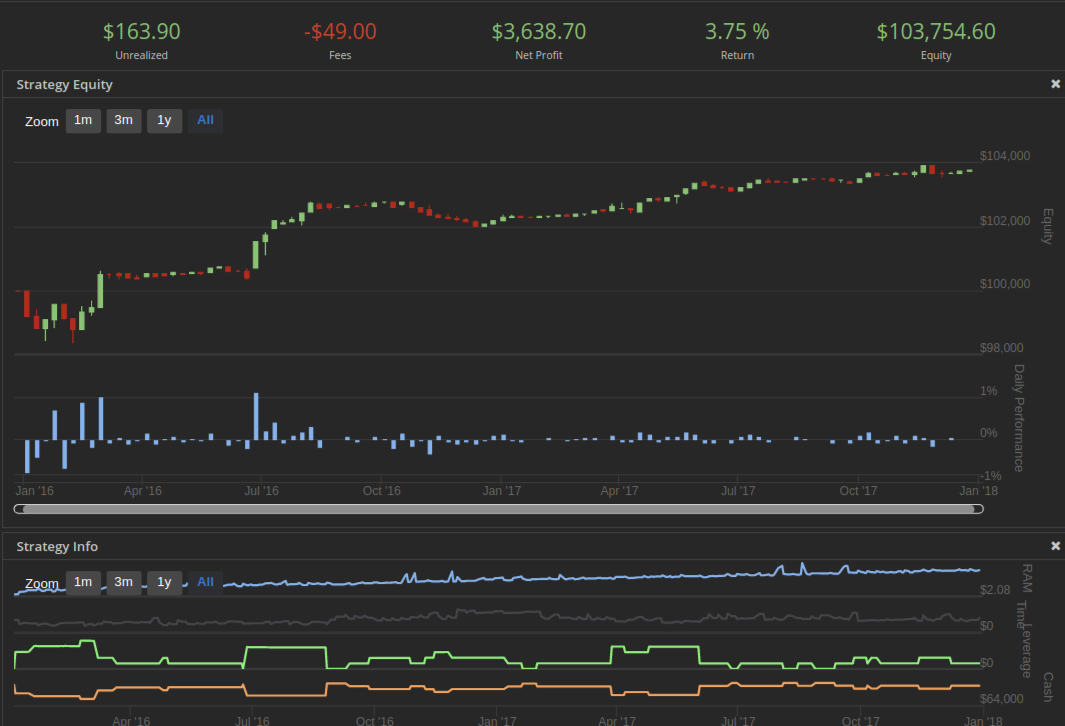
The initialize function has a lot going on. In addition to setting the parameters we create the custom charts to track leverage, cash, RAM usage, and computation time.
A quick note on the schedule functions; The way to read it is that the main functions are scheduled twice weekly on Monday and Friday to run after the market opens for the SPY etf at the designated number of minutes afterwards. The Action is the function we want to run at that time.
Another important note is that we initialize our price history dataframe. We call it once here for the full 252 day lookback. Later we define a function called update_prices() which computes the number of additional days of history to request between the current date and the last date of our self.prices dataframe. Then it requests only that limited history, concatenates and cleans up the data so we only have data for the specified lookback period. This methodology saves massive RAM/time during the backtest runs.
Next we define the check_liquidate() function which implements numbers 1 and 2 from the algorithm outline specified above.
Next we define two functions to implement the main algorithm computation. First we define the function compute() which takes a single symbol, fits the GMM, extracts the hidden states and their parameters and determines if any outlier events have occurred.
Then we define the run_main_algo() function which aggregates the compute() information into a dataframe from a list of rows if and only if outlier events have occurred. This is also to save RAM/time. This function constructs the long (and/or short) numpy arrays that will be sent to the send_orders() function.
Next we define the send_orders() function which is responsible for sending the orders and updating our list of order tickets contained in the self.openMarketOnOpenOrders list. It contains some checks for efficiency and error handling purposes.
Finally we define our CHART_RAM() function which actually tracks RAM usage, computation time, leverage and cash. We also define the OnData() function which we simply pass as all functions are scheduled.
Again the full script can be found in the ./scripts/ directory of the github repo. Sign up to Quantconnect.com and paste the script into the Algorithm Lab (backtesting) environment. Test the algorithm with various parameters and see what you discover.
Next Steps
In part 5 we will evaluate the results of my backtests using 1,2, and 4 GMM components