
Post Outline
- Intro
- Disclaimers
- The Secret to Scraping AJAX Sites
- The async_option_scraper script
- first_async_scraper class
- expirys class
- xp_async_scraper class
- last_price_scraper class
- The option_parser Module
- The Implementation Script
- References
Intro
This is Part 1 of a new series I'm doing in semi real-time to build a functional options data dashboard using Python. There are many underlying motivations to attempt this, and several challenges to implementing a tool like this from scratch.
- Where to get the data? Is it affordable? Easily accessible? API?
- How to parse the results?
- How to aggregate and organize the data for analysis?
- How to store the data? TXT, CSV, SQL database, HDF5??
- How often should it run?
- How to display the data? What dynamic graphic library to use? D3.js, MPL3d, Plotly, Bokeh, etc.?
These are some of the problems that need to be solved in order to create the tool.
In this post I show a current working solution to where to get the data, how to scrape it, how to parse it, and a storage method for fast read write access. We will scrape Barchart.com's basic option quotes using aiohttp and asyncio, both are included in Python 3.6 standard library. We will parse it using Pandas and Numpy and store the data in the HDF5 file format.
Disclaimers
This is primarily an academic exercise. I have no intent to harm or cause others to harm Barchart.com or its vendors. My belief is that, by facilitating knowledge sharing, we will increase the number of educated participants in the options markets; thereby increasing the total addressable market for businesses like Barchart and its vendors. By designing tools like this we improve our own understanding of the use cases and applications (option valuation and trading) and can provide better feedback to those in the product development process.
The Secret to Scraping Ajax Sites
First let's create a mental model of what AJAX really is.
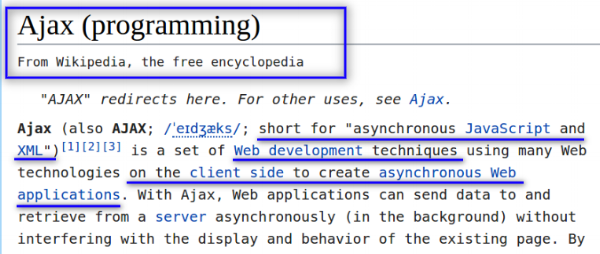
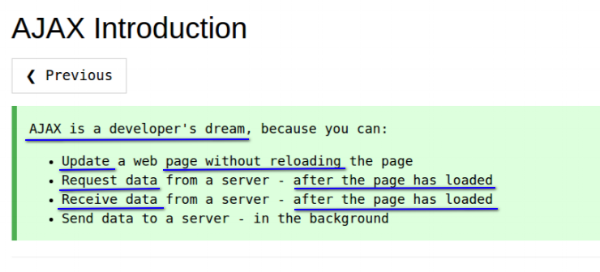
So looking at this, we can say AJAX is a set of web development techniques to increase the efficiency and user experience during website interaction. For example, you go to a website with cool data tables on it. You want to change one of the filters on the data so you select the option you want and click. What happens from there?
In simply designed or older websites your request would be sent to the server, then to update the data table with your selected filters would require the server response to reload the entire page. This is inefficient for many reasons but one is that, often the element in need of updating is only a fraction of the entire webpage.
AJAX allows websites to send requests to the server and update page elements on an element by element basis negating the need for reloading the entire page every time you interact with the page.
This improvement in efficiency comes at the added cost of complexity, for web designers and developers and for web scrapers. Generally speaking the url you use to go to an AJAX page is not the actual url that gets sent to the server to load the page you view.
To build this understanding, let's look at a sample option quote page using the following link <https://www.barchart.com/stocks/quotes/spy/options>.
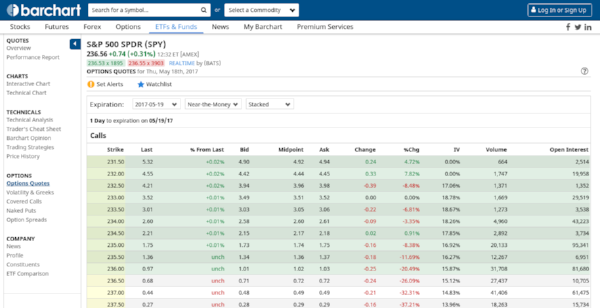
Barchart.com
Warning: To follow along with the rest of this example you need access to developer mode in Chrome or its equivalent in other browsers.
Let's look behind the curtain so to speak. Click anywhere in the page and click inspect. Navigate to the Network tab in Chrome developer tools.
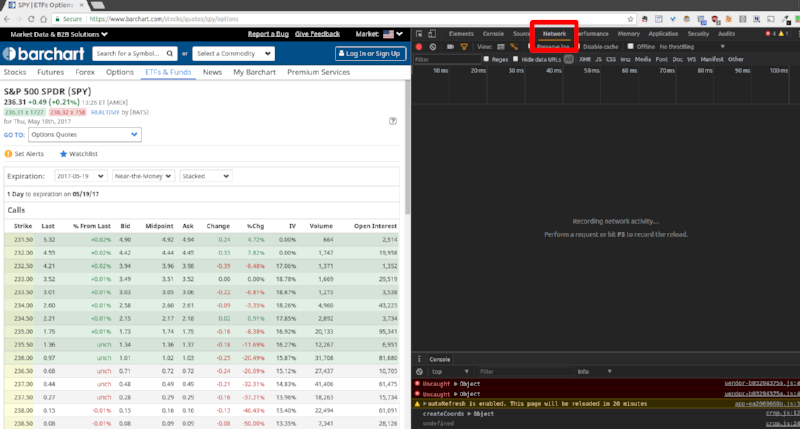
We're going to press F5 to reload the page and look for the following: Request Headers, and the Request URL.
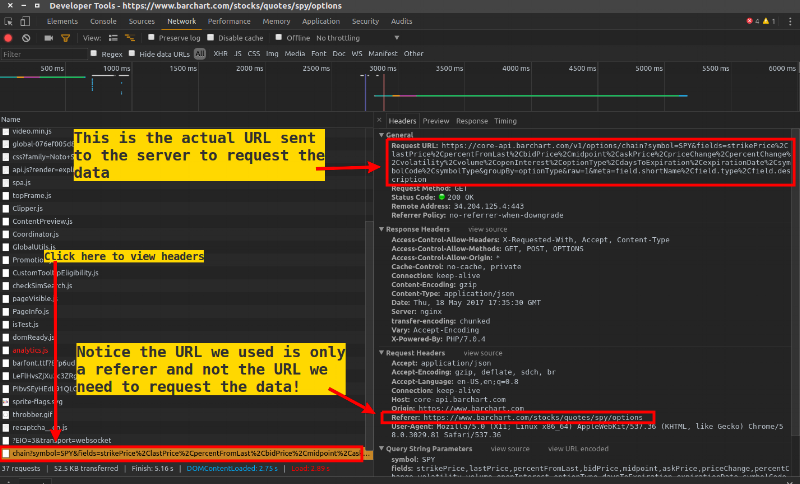
We will need the Request URL and the Request Headers in order to construct our calls to the server a little later. Simply put, this is the secret! We can replicate our browser's behavior when it requests data from the server if we know the actual request url and the request headers. This will be made clearer in the next section.
The async_option_scraper.py Module
This is the key module for scraping the data. First the imports.
first_async_scraper class
If you noticed when the page loads, it loads the nearest expiration date by default.
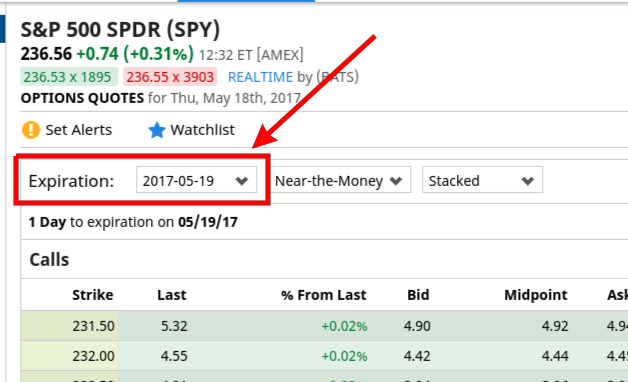
We know there are generally multiple expiration dates per symbol. However, some ETFs have weekly contracts, monthly, and/or quarterly. Instead of guessing the expiration dates, the first_async_scraper class scrapes the default pages so we can later extract the expiration dates directly from the page's JSON/dict response.
This class takes no initialization parameters.
The workhorse function is run which calls the internal function _fetch. Inside the run function I've hardcoded a request url similar to the one we found before. I've also hardcoded the headers we found earlier as well. Notice both objects are string formats which can be dynamically updated with our ETF symbol.
The _fetch function takes the ETF symbol, the url string, session object, and our request headers and makes the call to the server returning the response as a JSON /dict object.
The run function takes a list of symbols, and a user agent string - more on this later.
The aiohttp package has a very similar interface to the requests module. We first create a ClientSession object which acts like a context manager. After creating the session object, we loop through each symbol using the asyncio.ensure_future function to create and schedule the event task. The gather function executes the tasks asynchronously waiting until all tasks have completed. It returns a list of JSON responses, each representing one ETF.
The Expirys Class
Once we have the list of responses we need to extract the expiry dates from each page source, collecting them for later use. The class is initialized with two parameters - a list of ETF symbols, and the list of page responses from the first scrape job.
It uses two functions. The internal function _get_dict_expiry takes a single response object and returns the list of expirations for a single symbol. The exposed function get_expirys loops through the list of ETFs and responses aggregating them into a dictionary. The dictionary keys are the ETF symbols and the values are lists of expirations for that symbol.
xp_async_scraper class
The final scraper class is nearly identical to the first_async_scraper except for some additional arguments for the functions xp_run(), and _xp_fetch() to accept the expiry dates. Also notice that the hard coded URL in the xp_run function is slightly different in that it is formatted to accept the ETF symbol and an expiration date.
last_price_scraper class
This class has the same structure and form as the other scraper classes except slightly simpler. The purpose of this class is to simply retrieve the basic html source for each ETF so that we can later extract the last quote price for the underlying equity.
The option_parser.py Module
Once we have all the data we need to be able to parse it for easy analysis and storage. Fortunately this is relatively simple to do with Pandas. The option_parser.py module contains one class-option_parser, and three functions-extract_last_price(), create_call_df(), create_put_df().
The option_parser class is initialized with an ETF symbol and the appropriate response object. The create dataframe functions extract the call/put data from the JSON/dict response, then iterates through each quote combining them into dataframes taking care to clean the data set and change the datatypes from objects to numeric/datetime where appropriate. The extract_last_price function is used to get the underlying quote price from the basic html source.
The Implementation Script
Finally we can combine the modules into a script and run it. Note that this script requires the fake-useragent package. This package has a nice feature where it generates a random user agent string on every call. We need to do this so our requests are not blocked by the server.
The script imports a list of ETF symbols originally sourced from Nasdaq. Some of these symbols don't have options data, so they are filtered out. The script runs in the following order: basic html scraper -> first async scraper -> extracts the expiry dates -> xp async scraper which aggregates all the option data -> parses the collected data into a dataframe format -> downloads and inserts any missing underlying prices -> then saves it to disk as an HDF5 file.
Here's some sample output:
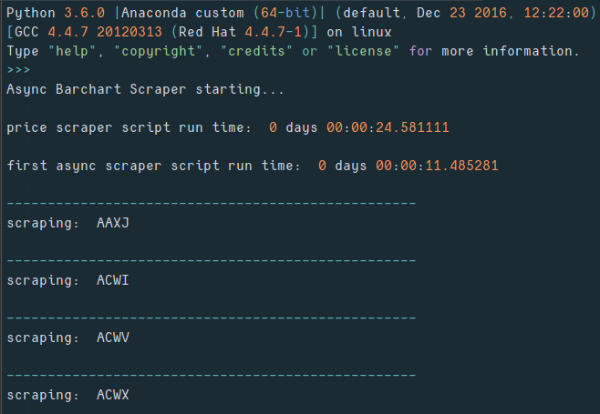
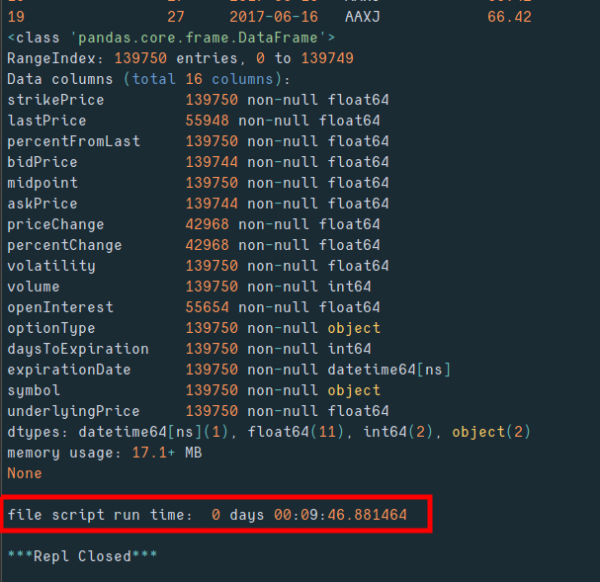
Get the code at the following Github-Gist links:
UPDATE: Here is the list of Nasdaq ETF symbols for download <ETF Symbol List CSV>
References
- Wikipedia.org - AJAX definition
- W3Schools.com - AJAX introduction
- Making 1 Million Requests with Python-aiohttp via https://pawelmhm.github.io - Great article on implementing asyncio with aiohttp
- Barchart.com - "Barchart, the leading provider of market data solutions for individuals and businesses."