Post Outline
- Recap
- The Problem
- The Solution
- Barchart Scraper Class
- Barchart Parser Class
- Utility Functions
- Putting it all together
- The Simple Trick
- Next Steps
Recap
In the previous post I revealed a web scraping trick that allows us to defeat AJAX/JavaScript based web pages and extract the tables we need. We also covered how to use that trick to scrape a large volume of options prices quickly and asynchronously using the combination of aiohttp and asyncio.
The Problem
It worked beautifully until... I told people about it. Shortly after publishing, my code stopped functioning. After investigating, it was clear no data was being returned during the aiohttp call to the Barchart server. I attempted to fix the code by adding the semaphore option to the asyncio call. Roughly speaking, in this context the semaphore option allows you to specify the max number of calls that can be made simultaneously. I tried, 100, 50, 10, 2 and they all failed.
I do not know what happened for sure, but if I had to guess, the increase in server loads per unit time measure, was significant enough for Barchart system/network staff to update their server settings and squash the multiple simultaneous calls.
The Solution
We simply build a sequential scraper instead of an asynchronous one. To make it more robust we have to add a simple twist to the code that makes it more difficult to diagnose human vs automated traffic.
Barchart Scraper Class
This class is similar to the previous version except asyncio is stripped out. It's main function is to create the POST url, call the server and return the response data. Please note, I tested this class with a dynamic referer symbol and random user agents and this simple hardcoded setup has worked most consistently for me.
The Barchart Parser Class
This class is essentially identical to the previous parser class and simply extracts call/put data into pandas dataframes.
Utility Functions
Next we devise 2 utility functions. The first function is simply a convenience function to run the first iteration of the scraper. We need to do that for each symbol in order to extract the expiration dates dynamically.
The second function is a little lambda function that gets the symbol's last daily price from Google Finance which we add to our dataset before saving to disk.
Putting It All Together
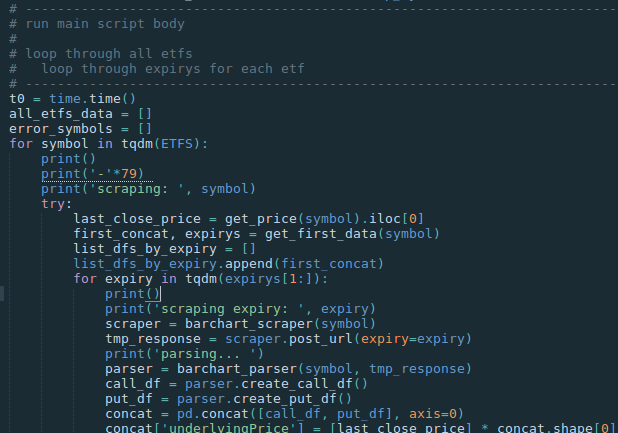
Next we can implement the main script body. Essentially it runs a main loop and an inner loop. For each symbol get the default first data, extract the expirys, and then for each expiration extract the data. At the end of the inner loop, all data for that symbol is concatenated and then appended to a list containing all the symbols' dataframes. Finally all the symbols dataframes are concatenated and saved to hdf.
The Simple Trick
Did you notice the random_wait at the end of the inner loop? We simply pass an array of reasonable wait times (measured in seconds) and their probabilities to numpy's random_choice() and pass the result to the time.sleep() function before iterating to the next symbol. This isn't guaranteed to always work, but in cases where servers may be restricting traffic loads it makes it much harder to identify your traffic as automated.
Ultimately, it's also a respectful way to operate our scraper.
Next Steps
Next up in the series I plan to explore the data collected over the last 6 weeks I've been running this script. I hope to explore multiple angles and dynamics in the data.
Do you have any suggestions for exploration topics? If so, leave a comment or contact me via email or twitter.